

Two tools help you change a live site safely. Git deploy copies your site from a GitHub or GitLab repository, with a button or on every push. Staging gives you a private copy of your site and its databases to try changes on first.
Git deploy tab: enter the repository address and branch, click Connect, then Deploy now. A backup is taken before every deploy. Staging card on the overview: Create staging copy, test there, then Push to live.
Git deploy
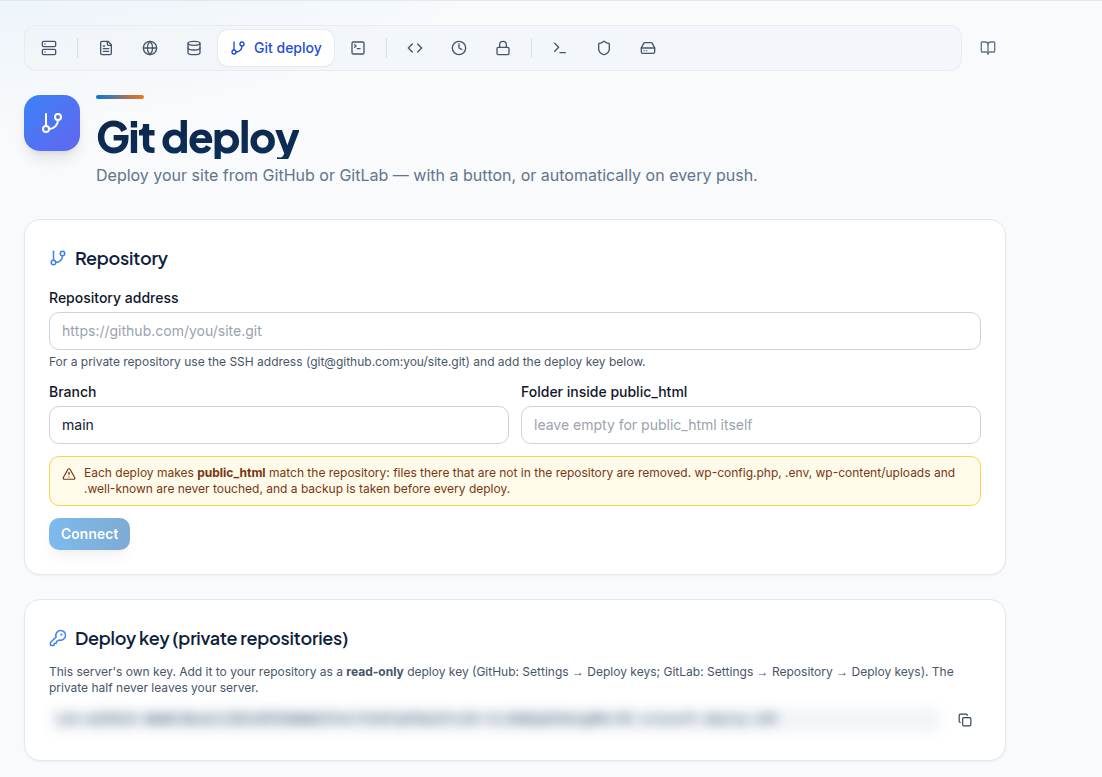
Connect a repository
- Log in to the client area, open Hosting, choose the Container hosting tab and click Manage next to your site. Go to the Git deploy tab.
- Repository address: for a public repository use the
https://address. For a private one use the SSH address ([email protected]:you/site.git) and add the deploy key below. - Branch: usually
main. - Folder inside public_html: leave empty to deploy into
public_htmlitself. - Click Connect. Confirm it is you if asked. Copy the webhook secret now; it is shown once.
Private repositories: the deploy key
The Deploy key card shows your server's own public key. Add it to the repository as a read-only deploy key: on GitHub under Settings > Deploy keys, on GitLab under Settings > Repository > Deploy keys.
Deploy
Click Deploy now. The server gets the code, takes a backup, then copies the files. The result shows the commit that went live.
Files in the deploy folder that are not in the repository are removed. wp-config.php, .env, wp-content/uploads and .well-known are never touched, and a backup is taken before every deploy. Keep uploads and secrets out of the repository.
Deploy on every push
The Deploy on every push card shows the webhook address.
- GitHub: Settings > Webhooks > Add webhook. Content type
application/json, your webhook secret, event "Just the push event". - GitLab: Settings > Webhooks, the secret as "Secret token", trigger "Push events".
Only pushes to your chosen branch deploy. Several pushes close together are combined: at most one push deploy runs every two minutes. Lost the secret? Click New secret and paste the new one into the webhook.
Roll back
Deploy history keeps the last 20 deploys. Click Redeploy this version on an earlier one. Only files go back; databases are not changed.
Staging

Create a staging copy
- On the overview, find the Staging card and click Create staging copy.
- Wait a few minutes while your site and databases are copied.
- Note the Address, Sign in name and Password. The password is shown once.
The staging site has its own address and asks for that sign-in in the browser, so visitors and search engines do not see it. Its files and database copies are separate from the live site. A staging copy cannot be made if it would fill your disk past 85%, or if your databases are larger than 2 GB in total.
Push staging to live
- Click Push to live and read the list of what will be replaced.
- Click Back up, then push.
A backup of the live site is taken first. Live files are replaced by the staging files (your live wp-config.php is kept), and each database is replaced by its staging copy.
Orders, comments or sign-ups made on the live site after staging was created are lost when the staging database replaces it. Push at a quiet time, or move only the files with Git.
To start fresh, click Delete staging and create a new copy. Deleting staging never touches the live site.
Frequently asked questions
Does a deploy change my database?
No. Git deploy copies files only. Database changes need your own migration, for example with WP-CLI or a script run in the Terminal.
Can I deploy from Bitbucket?
Any git host that the server can clone from works for Deploy now. Webhook instructions are given for GitHub and GitLab.
Will a deploy delete my uploads?
No. wp-config.php, .env, wp-content/uploads and .well-known are never touched. Other files not in the repository are removed from the deploy folder.
Can I refresh staging from live?
Delete the staging copy and create it again. That takes a fresh copy of the live site and databases.
Is my staging site public?
No. It asks for a sign-in name and password in the browser and is marked not to be indexed by search engines.